VoxCity tutorial — part of the tutorial series. Before running, make sure VoxCity is installed; most data sources also require Google Earth Engine authentication.
ENVI-met Export Demo
This notebook demonstrates how to export a VoxCity model to ENVI-met INX format for microclimate simulation.
Contents: 0. Prepare environment (Google Colab)
Generate or load a VoxCity model
Basic INX export (default settings)
Generate the plant database (EDB file)
Customize land cover → ENVI-met ID mapping
Customize building materials (wall & roof) and rooftop vegetation
Configure grid settings (telescoping, vertical stretch)
Putting it all together
Reference: Available soil profile IDs
0. Prepare environment (Google Colab)
#@title 0.1. Install voxcity
!pip install voxcity
!apt-get update
!apt-get install -y xvfb libgl1-mesa-glx
#@title 0.2. Authenticate Google Earth Engine (Click link, generate token, copy and paste the token)
!earthengine authenticate --auth_mode=notebook
0.3. Set target area
Choose Option 1 to set coordinates directly, or Option 2 to draw a rectangle on an interactive map.
Option 1: Set coordinates of vertices
rectangle_vertices = [
    (139.7600, 35.6800),  # Southwest corner (longitude, latitude)
    (139.7600, 35.6900),  # Northwest corner
    (139.7700, 35.6900),  # Northeast corner
    (139.7700, 35.6800),  # Southeast corner
]
Option 2: Draw a rectangle on a map
Use the panel to set the city, switch drawing modes (Aligned / Rotated / Fixed), and adjust dimensions.
from voxcity.geoprocessor.draw import create_rectangle_map

ui, rectangle_vertices = create_rectangle_map()
ui
1. Generate or load a VoxCity model
Choose Option A to generate a new model, or Option B to load a previously saved one.
dem_source: For ENVI-met simulations, it is recommended to use flat terrain (dem_source="Flat"). ENVI-met V5.7.1 often predicts unphysical results for complex terrains (see ENVI-met documentation), so we strongly recommend not using DEM when conducting ENVI-met simulations. If your study area has significant elevation differences, you can specify other DEM sources (e.g., "NASA", "COPERNICUS", "FABDEM"), but use with caution.
remove_perimeter_object (optional, float between 0 and 1): Removes objects near the edges of the grid to avoid boundary artifacts from partially captured buildings or canopy. The value specifies the fraction of the grid size used as the removal strip width. For example, 0.1 removes all objects within the outer 10% on each side. Within the perimeter strip:
Buildings that touch the strip are removed entirely (including parts extending into the interior)
Trees (canopy) are cleared- Land cover is set to “Developed space” (class 11)
# Option A: Generate a new model
from voxcity.generator import get_voxcity

meshsize = 5  # meters
voxcity = get_voxcity(rectangle_vertices, meshsize, dem_source="Flat", remove_perimeter_object=0.1)
[Taichi] version 1.7.4, llvm 15.0.1, commit b4b956fd, win, python 3.12.9
INFO | voxcity.voxcity.generator.api | Auto-selecting data sources for: building_source, land_cover_source, canopy_height_source, dem_source, building_complementary_source
[Taichi] Starting on arch=cuda
Loading formatted geocoded file...
INFO | voxcity.voxcity.generator.api | Detected country for ROI center (139.7650, 35.6850): Japan
2026-04-10 14:31:11,774 - WARNING - Encountered 403 Forbidden with reason "PERMISSION_DENIED"
INFO | voxcity.voxcity.generator.api | Selected data sources:
INFO | voxcity.voxcity.generator.api | - Buildings(base)=OpenStreetMap | https://www.openstreetmap.org
INFO | voxcity.voxcity.generator.api | - Buildings(comp)=None
INFO | voxcity.voxcity.generator.api | - LandCover=OpenEarthMapJapan | https://www.open-earth-map.org/demo/Japan/leaflet.html
INFO | voxcity.voxcity.generator.api | - Canopy=Static
INFO | voxcity.voxcity.generator.api | - DEM=Flat
INFO | voxcity.voxcity.generator.api | - ComplementHeight=10
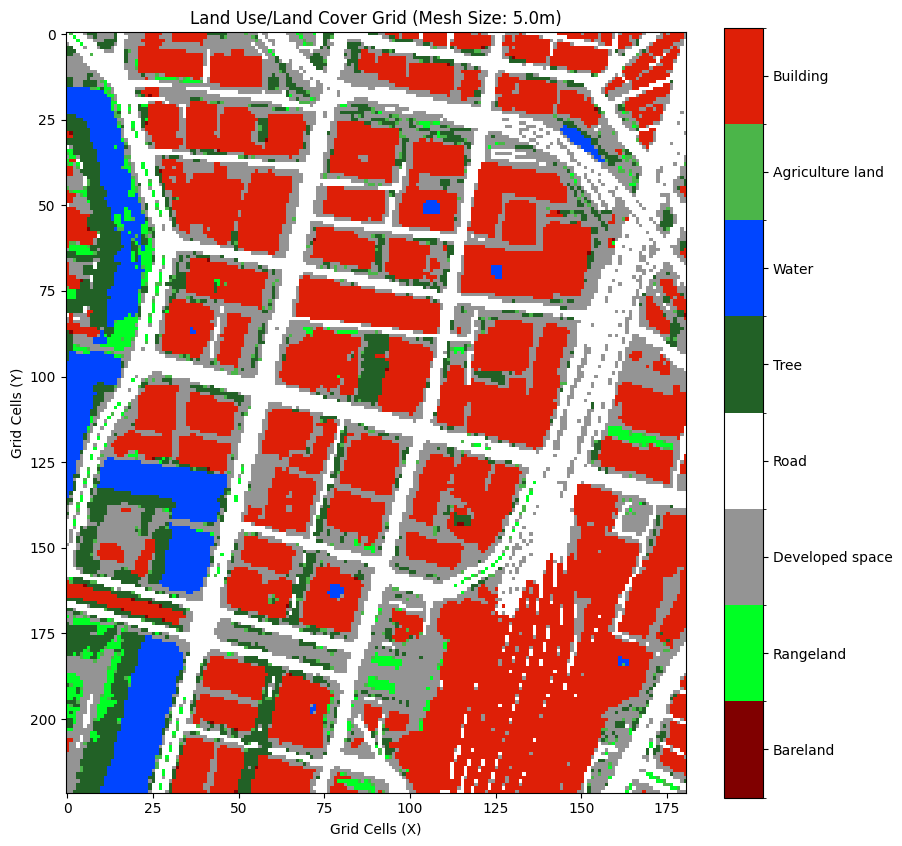
Creating Land Use Land Cover grid

Data source: OpenEarthMapJapan

OpenEarthMapJapan Land Cover Classes (source-specific, 0-based indices):
-------------------------------------------------------
   0: Bareland
   1: Rangeland
   2: Developed space
   3: Road
   4: Tree
   5: Water
   6: Agriculture land
   7: Building
-------------------------------------------------------
Note: These source-specific classes will be converted to
      VoxCity Standard Classes (1-14) during voxelization.

Access 2D land cover grid from VoxCity object:
  land_cover_grid = voxcity.land_cover.classes

Downloading tiles
Composing image with dimensions: 1024x1024
GeoTIFF saved as 'output\land_cover.tif' in Web Mercator projection (EPSG:3857).
c:\Users\kunih\miniconda3\envs\voxcity\Lib\site-packages\osgeo\gdal.py:606: FutureWarning: Neither gdal.UseExceptions() nor gdal.DontUseExceptions() has been explicitly called. In GDAL 4.0, exceptions will be enabled by default.
  warnings.warn(
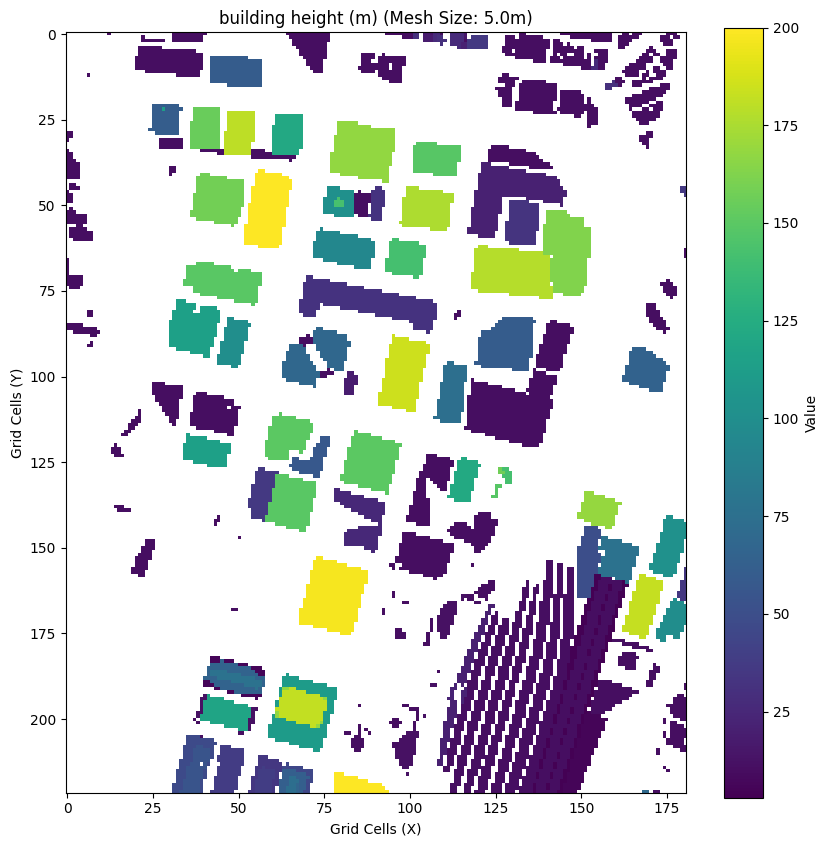
Creating Building Height grid

Base data source: OpenStreetMap
Complementary data source: None
239 of the total 351 building footprint from the base data source did not have height data.
INFO | voxcity.voxcity.generator.voxelizer | Generating 3D voxel data
INFO | voxcity.voxcity.generator.voxelizer |
Voxel Grid Semantic Codes:
  -3 : Building volume
  -2 : Tree canopy (vegetation)
  -1 : Ground/Subsurface
  >=1: Land cover class at ground surface (see Land Cover Classes)

INFO | voxcity.voxcity.generator.voxelizer |
VoxCity Standard Land Cover Classes (1-based indices, used in voxel grids):
--------------------------------------------------
   1: Bareland           - Bare soil, rocks, desert
   2: Rangeland          - Grassland, pasture
   3: Shrub              - Shrubland, bushes
   4: Agriculture land   - Cropland, farmland
   5: Tree               - Forest, tree cover
   6: Moss and lichen    - Moss, lichen cover
   7: Wet land           - Wetland, marsh
   8: Mangrove           - Mangrove forest
   9: Water              - Water bodies
  10: Snow and ice       - Snow, ice, glaciers
  11: Developed space    - Urban areas, parking
  12: Road               - Roads, paved surfaces
  13: Building           - Building footprints
  14: No Data            - Missing or invalid data
--------------------------------------------------
Note: Source-specific land cover classes are converted to these
      standard classes during voxelization.

INFO | voxcity.voxcity.generator.voxelizer | Voxel grid shape: (222, 181, 43), dtype: <class 'numpy.int8'>, ~1.6 MB
VoxCity results saved to output/voxcity.h5
# Option B: Load a previously saved model
# from voxcity.generator.io import load_voxcity
# voxcity = load_voxcity("output/voxcity.h5")
#@title Visualize the generated 3D city model (This process may take a long time, so skip this step if you set a large target area)
from voxcity.visualizer import visualize_voxcity

visualize_voxcity(voxcity, mode="interactive")
The Kernel crashed while executing code in the current cell or a previous cell.

Please review the code in the cell(s) to identify a possible cause of the failure.

Click <a href='https://aka.ms/vscodeJupyterKernelCrash'>here</a> for more info.

View Jupyter <a href='command:jupyter.viewOutput'>log</a> for further details.
2. Basic INX export (default settings)
The simplest usage — export with all default ENVI-met IDs and grid settings.
from voxcity.exporter.envimet import export_inx, generate_edb_file

output_directory = './output/envimet'
file_basename = 'voxcity'

# Export the INX model file
export_inx(voxcity, output_directory, file_basename)

print(f"INX file saved to {output_directory}/{file_basename}.INX")
3. Generate the plant database (EDB file)
ENVI-met needs a plant database (.edb) that defines the 3D tree models referenced in the INX file.
generate_edb_file() creates projectdatabase.edb with trees from 1–50 m height.
Parameters:
lad— Leaf Area Density in m²/m³ (default: 1.0)trunk_height_ratio— ratio of trunk height to total tree height (default: 11.76/19.98 ≈ 0.59)output_dir— directory to write the file (default: current directory)
# Generate with default LAD and save to the same output directory as the INX
generate_edb_file(
    lad=1.0,
    trunk_height_ratio=11.76 / 19.98,
    output_dir='./output/envimet'
)

print("EDB file saved to ./output/envimet/projectdatabase.edb")
# Example: denser canopy with higher LAD
generate_edb_file(
    lad=2.0,
    output_dir='./output/envimet'
)
How to use the EDB file in ENVI-met
After generating the projectdatabase.edb file, you need to register it as the project database in ENVI-met so that the 3D plant definitions (trees) are recognized.
Steps:
Place the file — Copy
projectdatabase.edbinto your ENVI-met project folder (the same folder that contains the.INXfile), or note its location.Open ENVI-met — Launch ENVI-met and open (or create) the project that will use your INX model.
Set the project database — Go to Edit → Project Database (or open the Database Manager). Use File → Open to load the
projectdatabase.edbfile. This tells ENVI-met where to find the custom tree definitions (e.g.,H05W01,H10W01, …,H50W01).Load the INX model — Open the generated
.INXfile in ENVI-met SPACES. The 3D plant IDs in the model will now resolve to the tree definitions in your EDB file.Verify — In SPACES, check that trees appear correctly by inspecting the 3D plant layer. Each plant ID corresponds to a tree of a specific height (e.g.,
H10W01= 10 m tall tree).
Tip: The EDB file and the INX file must be in the same project folder for ENVI-met to automatically discover the plant database. If they are in different locations, you will need to manually load the EDB via the Database Manager.
4. Customize land cover → ENVI-met ID mapping
VoxCity uses a standard 14-class land cover classification. When exporting to ENVI-met, each class is mapped to:
A vegetation (simple plant) ID — the
<ID_plants1D>gridA soil profile / surface ID — the
<ID_soilprofile>grid
You can override any of these defaults using the envimet_mapping parameter.
Each key is the 1-based land cover class index, and the value is a dict with
optional 'veg' and/or 'mat' keys.
Note: Tree vegetation (class 5,
'veg'key) cannot be customized here — trees are handled as 3D plants via the EDB database.
Default mapping reference
Class |
Land Cover |
Default veg ID |
Default mat ID |
Description |
|---|---|---|---|---|
1 |
Bareland |
(empty) |
|
Default soil |
2 |
Rangeland |
|
|
Grass / default soil |
3 |
Shrub |
|
|
Hedge / default soil |
4 |
Agriculture |
|
|
Grass / default soil |
5 |
Tree |
(3D plant) |
|
Handled via EDB |
6 |
Moss/lichen |
|
|
Grass / default soil |
7 |
Wetland |
|
|
Grass / water |
8 |
Mangrove |
(empty) |
|
Water |
9 |
Water |
— |
|
Water |
10 |
Snow/ice |
— |
|
Default soil |
11 |
Developed |
— |
|
Concrete pavement gray |
12 |
Road |
— |
|
Asphalt road |
13 |
Building |
— |
|
Default soil |
14 |
No Data |
— |
|
Default soil |
# Example: customize specific land cover classes
envimet_mapping = {
    # Class 2 (Rangeland): use a different grass species
    2: {'veg': '0200XX'},

    # Class 11 (Developed): use lighter concrete pavement
    11: {'mat': '0200PL'},   # Concrete Pavement Light

    # Class 12 (Road): use red-coated asphalt
    12: {'mat': '0200AR'},   # Asphalt road with red coating

    # Class 7 (Wetland): change both veg and surface
    7: {'veg': '0200XX', 'mat': '0200WW'},
}

export_inx(
    voxcity,
    output_directory='./output/envimet_custom',
    file_basename='voxcity_custom',
    envimet_mapping=envimet_mapping,
)

print("Custom INX exported.")
5. Customize building materials (wall & roof)
ENVI-met applies a common wall material and common roof material to all buildings.
By default these are 000000 (ENVI-met system default: moderate insulation).
Common wall material IDs
ID |
Description |
|---|---|
|
Default Wall - moderate insulation |
|
Default Wall - moderate insulation |
|
Concrete Wall (heavy) |
|
Concrete wall (light weight) |
|
Brick wall (burned) |
|
Clear Float glass (one layered) |
|
Heat protection glass (one air layer) |
Common roof material IDs
ID |
Description |
|---|---|
|
Default Wall - moderate insulation |
|
Roofing: Tile |
|
Concrete Wall (heavy) |
|
Aluminium (single layer) |
# Example: set brick walls with tile roof
export_inx(
    voxcity,
    output_directory='./output/envimet_materials',
    file_basename='voxcity_brick',
    common_wall_material='0200B2',   # Brick wall (burned)
    common_roof_material='0200R1',   # Roofing: Tile
)

print("INX with custom wall/roof materials exported.")
Rooftop vegetation (green roofs)
By default, 1D vegetation (grass, shrubs, etc.) is removed from cells that contain buildings. This prevents unrealistic ground-level plants from appearing inside building footprints.
Set rooftop_vegetation=True to keep 1D vegetation on building cells — useful for
modeling green roofs or rooftop gardens in ENVI-met.
# Example: export with green roofs (keep 1D vegetation on building cells)
export_inx(
    voxcity,
    output_directory='./output/envimet_greenroof',
    file_basename='voxcity_greenroof',
    rooftop_vegetation=True,
)

print("INX with rooftop vegetation exported.")
6. Configure grid settings
ENVI-met supports a telescoping grid where vertical cell size increases above a certain height, reducing total cell count while keeping fine resolution near the ground.
Parameters:
useTelescoping_grid(bool) — enable/disable telescoping (default:False)verticalStretch(float) — percentage increase per cell above start height (default: 20%)startStretch(float) — height (m) to begin stretching (default: auto from max building height)domain_building_max_height_ratio(float) — ratio of domain height to max building (default: 3)min_grids_Z(int) — minimum number of vertical grid cells (default: 20)author_name(str) — author name in the INX metadatamodel_description(str) — description in the INX metadata
# Example: telescoping grid with metadata
export_inx(
    voxcity,
    output_directory='./output/envimet_telescoping',
    file_basename='voxcity_tele',
    useTelescoping_grid=True,
    verticalStretch=20,         # 20% growth per cell
    startStretch=50,            # start stretching at 50m
    domain_building_max_height_ratio=3,
    min_grids_Z=30,
    author_name='VoxCity User',
    model_description='Telescoping grid demo',
)

print("Telescoping grid INX exported.")
7. Putting it all together
Combine all customization options — including rooftop vegetation — in a single export call.
output_dir = './output/envimet_full'

# 1) Export INX with all customizations
export_inx(
    voxcity,
    output_directory=output_dir,
    file_basename='voxcity_full',
    # Land cover → ENVI-met ID overrides
    envimet_mapping={
        11: {'mat': '0200PL'},  # Developed → Concrete Pavement Light
        12: {'mat': '0200AR'},  # Road → Asphalt with red coating
    },
    # Building materials
    common_wall_material='0200B2',
    common_roof_material='0200R1',
    # Rooftop vegetation
    rooftop_vegetation=True,
    # Grid settings
    useTelescoping_grid=True,
    verticalStretch=20,
    min_grids_Z=25,
    # Metadata
    author_name='VoxCity User',
    model_description='Full customization demo',
)

# 2) Generate plant database in the same directory
generate_edb_file(
    lad=1.0,
    output_dir=output_dir,
)

print(f"All files saved to {output_dir}/")

print("  - voxcity_full.INX")
print("  - projectdatabase.edb")
8. Reference: Available soil profile IDs
These are the most commonly used ENVI-met soil profile IDs (for 'mat' in envimet_mapping):
ID |
Description |
|---|---|
|
Default Sandy Loam |
|
Asphalt Road |
|
Pavement (Concrete), used/dirty |
|
Concrete Pavement Gray |
|
Concrete Pavement Light |
|
Concrete Pavement Dark |
|
Deep Water |
|
Default Unsealed Soil (Sandy Loam) |
|
Loamy Soil |
|
Sandy Soil |
|
Brick road (red stones) |
|
Brick road (yellow stones) |
|
Dark Granite Pavement |
|
Granite Pavement (single stones) |
|
Granite shining |
|
Asphalt road with red coating |
|
Basalt Brick Road |
|
Wood Planks |
|
Darker Wood Planks |